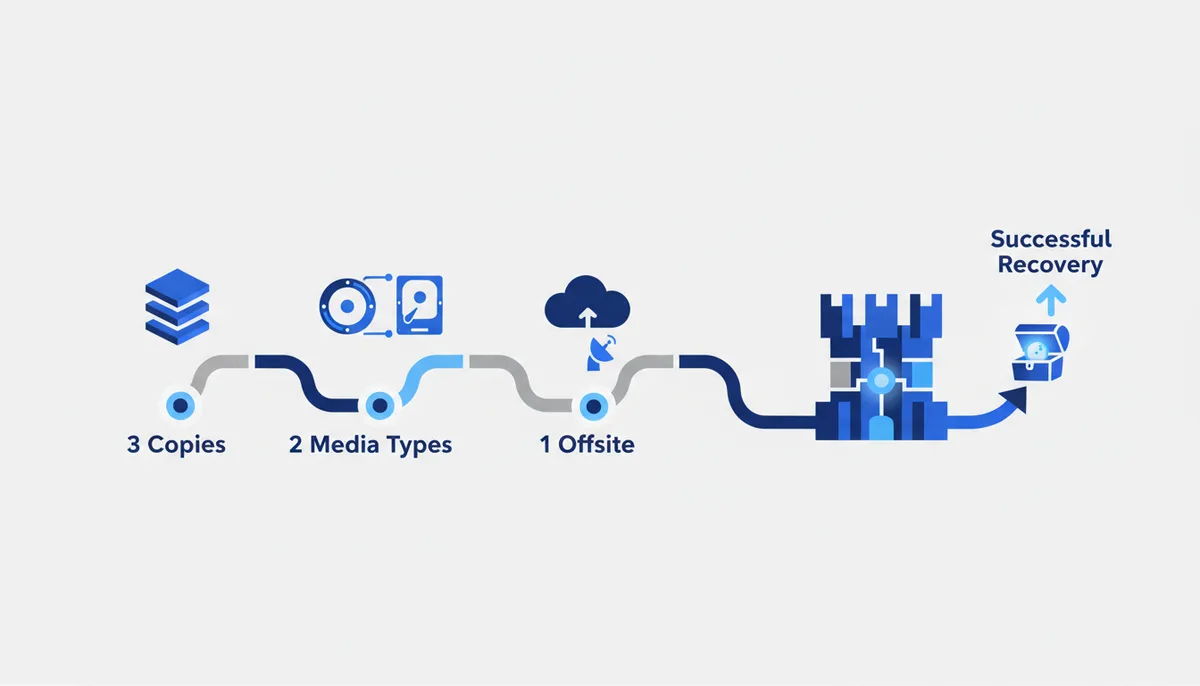
The 3-2-1 rule: keep 3 copies of your data, on 2 different media, with 1 of them away from home (offsite). This protects you from a dead drive, ransomware, theft, a flood and an accidental delete. The restic commands are checked against the official
restic.readthedocs.io.
🧭 The whole picture
What you end up with: a configured, automatic and — most importantly — VERIFIED backup of your important data. Not "I copied it somewhere, I think", but a system you know for a fact you can restore from.
Why 3-2-1 specifically. One copy is zero copies: the drive dies, ransomware hits, the laptop gets stolen — and that is it. The rule in plain words:
- 3 copies — the original plus two backups (a single failure will not wipe everything).
- 2 different media — e.g. an internal drive + an external one/NAS (one failure mode will not take both).
- 1 offsite — one copy physically somewhere else (the cloud or a drive at your mother's place): a fire, a theft or a flood at home cannot reach it.
The golden rule: a backup you have never restored from is NOT a backup, it is a hope. Half of this guide is about verifying restores.
The path has 5 steps: decide what and where → make the local copy (restic) → send the offsite copy → automate → verify the restore (regularly).
💡 Why restic: open source, free, cross-platform; it encrypts the data (an offsite copy in the cloud is safe), deduplicates (the second backup takes almost no space — it stores only the changes) and can push to the cloud (S3, Backblaze B2 and others).
Step 1. Decide WHAT and WHERE to back up
What we do: identify the valuable data and the three storage locations.
- What: documents, photos, projects/code (if not all of it is in git), databases, configs, correspondence. What you do NOT need: anything easy to download again (the OS, applications,
node_modules, caches). - Where (the 3-2-1 plan):
- Copy 1 — the original on your working machine.
- Copy 2 — a local backup on a DIFFERENT medium (external drive / NAS / second drive).
- Copy 3 — offsite: cloud storage (Backblaze B2 / S3-compatible) or a drive that physically lives somewhere else.
How to tell it worked: you have a list of "what we back up" and three concrete locations (two media + one offsite). You have estimated the volume — there is enough room in each.
Common mistakes:
- Backing up "everything", including the OS and caches → bloat and slowness. Back up data, not things you can reinstall.
- The "second copy" on the same physical drive (a different partition) → that is NOT a second medium. The drive dies and both die. You need a genuinely separate medium.
- Both copies at home → no offsite. A fire or a theft takes everything. One copy must live away from home.
Step 2. The local copy via restic (to an external drive)
What we do: install restic, create an encrypted repository on the external medium and run the first backup.
# install: macOS — brew install restic; Ubuntu — sudo apt install restic;
# Windows — winget install restic.restic (or download from restic.net)

# create the repository on the external drive (once). Pick a STRONG password and store it separately:
restic -r /Volumes/Backup/restic-repo init

# the first backup of the folders you need:
restic -r /Volumes/Backup/restic-repo --verbose backup ~/Documents ~/Pictures ~/Projects
How to tell it worked: after init — a message saying the repository was created. After backup — a line like snapshot abcd1234 saved. Check the list of copies:
restic -r /Volumes/Backup/restic-repo snapshots # your snapshot is there with its date and paths
Common mistakes:
- Forget the repository password and the data is gone FOREVER. restic encrypts, and there is no password recovery by design. Save the password in a password manager IMMEDIATELY.
- The drive path is wrong or the drive is not plugged in → an error. On macOS external drives live in
/Volumes/..., on Linux at the mount point, on Windows under a drive letter. - Backing up a network or removable drive that is not there → the backup silently does not happen. For automation, check that the medium is attached (see Step 4).
Step 3. The offsite copy (cloud / another location)
What we do: create the third copy away from home. Since restic encrypts, the cloud is safe (the provider only sees ciphertext).
# the "cloud" option: a restic repository straight in S3-compatible storage (e.g. Backblaze B2).
# access keys go in environment variables (not in the command!):
export AWS_ACCESS_KEY_ID=<key>
export AWS_SECRET_ACCESS_KEY=<secret>
restic -r s3:s3.us-west-001.backblazeb2.com/my-bucket init      # once
restic -r s3:s3.us-west-001.backblazeb2.com/my-bucket backup ~/Documents ~/Pictures
The "no cloud" option: the same restic ... backup onto a SECOND external drive that you keep away from home (at the office, at a relative's) and periodically bring back to update.
How to tell it worked: restic -r <cloud> snapshots shows a snapshot in the cloud repository; the cloud console shows the space used. The offsite copy exists and is being updated.
Common mistakes:
- Access keys typed straight into the command or script → they leak into shell history or into git. Only via environment variables or a file with 600 permissions.
- Wrong bucket endpoint/region → a connection error. Check the S3 address against the provider's console.
- Thinking cloud sync (Dropbox/iCloud) equals a backup. It does NOT: a delete or a ransomware encryption syncs up to the cloud and overwrites the files there too. You need a versioned backup (restic keeps a history of snapshots).
Step 4. Automate it (so you never forget)
What we do: put the backup on a schedule — a manual backup gets abandoned sooner or later.
- Write a short
backup.sh: back up to the drive + back up to the cloud + clean out old copies.
#!/usr/bin/env bash
set -e
export RESTIC_PASSWORD_FILE=~/.restic-pass        # the password in a file with 600 permissions, not in the script
restic -r /Volumes/Backup/restic-repo backup ~/Documents ~/Pictures ~/Projects
# keep a sensible history depth and delete the rest:
restic -r /Volumes/Backup/restic-repo forget --keep-daily 7 --keep-weekly 4 --keep-monthly 6 --prune
- Put it on a schedule: cron (Linux/macOS, e.g. nightly) or launchd (macOS) / Task Scheduler (Windows).
How to tell it worked: the next day restic snapshots shows a fresh snapshot dated today — the schedule fired on its own. The script log has no errors.
Common mistakes:
- The password/keys sitting in the script → a leak. Use
RESTIC_PASSWORD_FILEand env variables, andchmod 600the file. forgetwithout--prune→ old snapshots are "forgotten" but the disk space is not freed.--pruneis what actually deletes the data.- The schedule exists but the medium or the network is unavailable when it fires → a silent skip. Add a check and a failure notification to the script (so you notice the backup has stopped running).
Step 5. VERIFY the restore (the most important part)
What we do: make sure the data can genuinely be pulled back out of the backup. Without this step everything above is an illusion of safety.
# 1) check the repository integrity (has the data rotted?):
restic -r /Volumes/Backup/restic-repo check

# 2) a trial RESTORE into a separate folder (NOT over the original!):
restic -r /Volumes/Backup/restic-repo restore latest --target ~/restore-test

# 3) restore from the cloud copy too — check that the offsite one works:
restic -r s3:s3.us-west-001.backblazeb2.com/my-bucket restore latest --target ~/restore-test-cloud
Open the restored files — the photos open, the documents are intact, the project runs.
How to tell it worked: check reports everything is fine ("no errors were found"); ~/restore-test holds your files and they open. You have personally confirmed that restoring works — from both the local and the offsite copy.
Common mistakes:
- Never testing the restore — the classic catastrophe: years of "backing up", and on the day it matters the repository is corrupt, the password is forgotten, or the wrong folders were being copied. Test a restore at least once every couple of months.
- Restoring with
--targetinto the same folder over the original → you can overwrite the current files. Always restore into a SEPARATE folder and compare. - Testing only the local copy and never the offsite → in a real disaster (the house with the drive in it burns down) you discover the cloud one was never configured. Test both.
🧠 For the senior
- Retention policy:
forget --keep-daily/weekly/monthly/yearly+--pruneon a schedule; think through your RPO (how much data you can afford to lose → frequency) and RTO (how fast you must be back → where the "hot" copy lives). - Immutability against ransomware: put the offsite copy in object storage with Object Lock / an immutable bucket, or use an append-only restic key — so that malware or an attacker on your host CANNOT delete the backups. This closes the main hole in 3-2-1.
- Monitoring and alerts: alert on a failed or stale backup (no fresh snapshot for N days), a healthcheck ping from the script;
restic check --read-data-subsetperiodically reads part of the actual data, not just the structure. - Database consistency: do not copy live DBMS files on the fly — take a dump (
pg_dump/mysqldump) or a filesystem snapshot, otherwise the backup may be inconsistent. - Key security: the repo password and the S3 keys belong in a secret manager; for servers, use a separate restricted storage account (append-only), not the master key.
⚠️ Warnings
- The repo password/key is the only way in. Lose it and the data is lost forever. restic encrypts with no "forgot my password" flow. Save the password in a password manager and duplicate it somewhere safe IMMEDIATELY when you run
init. - Sync ≠ backup. Dropbox/iCloud/Google Drive instantly replicate deletions and file encryption into the cloud. You need a versioned backup with history (restic), one you can pull yesterday's state from.
- Ransomware goes after backups too. If the backup drive is always attached and writable, the malware will encrypt it as well. Unplug the medium between backups and/or make the offsite copy immutable.
- A restore test is not a "someday" thing. The most expensive mistake is discovering the backup does not work at the exact moment you need it. Test restores regularly, before disaster strikes.
🆘 Rescue prompt
Help me set up backups following the 3-2-1 rule, explain it step by step.
WHAT I BACK UP: <documents / photos / code / databases — and the rough volume>.
WHAT I HAVE: <external drive? NAS? cloud (which one)?>. MY OS: <macOS / Windows / Linux>.
I AM STUCK: <restic will not install / an init/backup error / I do not get how to do offsite / how to automate it>.

What to do:
1) Help me lay out my data along the 3-2-1 scheme (2 media + 1 offsite) using what I already have.
2) Give me the exact restic commands for my OS: init, backup, snapshots, the schedule, forget+prune.
3) Crucially — how to verify the restore (check + restore into a separate folder), both locally and from offsite.
4) Warn me about the repository password (losing it is the end), about "sync ≠ backup" and about ransomware protection.
💎 Depth and value
- Calm instead of fear. Losing photos, projects and documents is a pain you cannot undo. A working 3-2-1 setup turns "what if it breaks/gets stolen/gets encrypted" from a catastrophe into a minor annoyance: you restore and get back to work.
- Protection from every threat at once, not just one. Three copies on two media with one offsite cover a dead drive, ransomware, theft, fire and your own "deleted the wrong thing" all at the same time. No single incident takes everything.
- Verification is what separates a real backup from an illusion. Most people "back up" and still lose their data, because they never once restored. The habit of running a test restore regularly is exactly the maturity that will one day save years of your work and memories.