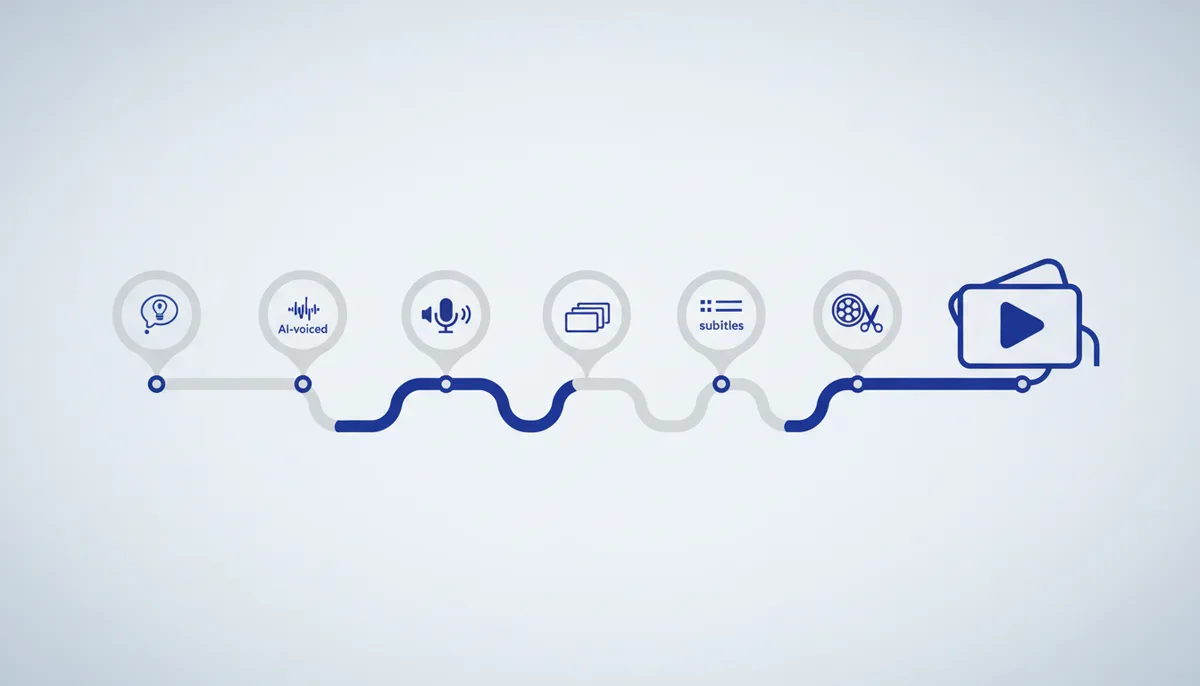
The principle of the video (more important than its style): hook in 2–3 sec → retention → CTA. Vertical 9:16 format, cuts that follow the meaning, subtitles, finished off with ffmpeg. Any AI mentor will do; the specific services are interchangeable — stick to the pipeline, not the buttons.
🧭 The big picture
What you end up with: a finished vertical video, final.mp4 (1080×1920), with an AI voiceover, images/footage and burned-in subtitles — no filming yourself, no studio, on almost entirely free tools. Ready to upload to Shorts/Reels/TikTok.
Why this way. Short video runs on strict dramaturgy: the first 2–3 seconds decide whether people watch on (the hook), the middle holds them, and the end has the call to action (CTA: subscribe/comment/link). Most people watch with the sound off — which is why subtitles are mandatory. You don't need a face: "faceless" means voice + visuals.
A six-step pipeline: topic/hook → script → voiceover → footage → subtitles → edit. Swap tools inside the steps freely — it's the sequence that matters.
💡 Set up a working folder and put all the files in it (
voice.mp3,bg.png,subs.srt) — that keeps the ffmpeg commands short and free of path confusion.
Step 1. Topic and hook
What we're doing: one clear idea for the video plus a strong hook for the first 2–3 seconds (a question / a promise / a conflict).
🤖 "Give me 10 hooks (the first 3 seconds) for a Short about <…>. The goal is retention. Short, conversational."
How to tell it worked: the hook grabs you within 3 seconds and promises a benefit or intrigue ("Never do X if…", "3 mistakes in Y"). Read it out loud — if you want to keep listening, it works.
Common mistakes:
- A long intro — "hi everyone, today we're going to talk about…" — and the viewer is gone. Get to the point from the first second.
- A topic "about everything" — there's no single idea. One video = one idea.
Step 2. Script
What we're doing: the structure hook → 3–5 short meaning blocks → CTA. Built for vertical and 30–60 seconds (≈90–150 words).
🤖 "Write a script for a 45-second vertical video about <…>: hook, body in bullet points, CTA. Plain language, short phrases — it's for a voiceover."
How to tell it worked: read aloud, the text takes exactly the time you need (≈140 words/min of conversational speech → 45 sec ≈ 100 words). Short phrases, no convoluted clauses — otherwise a synthetic voice will stumble.
Common mistakes:
- Long complex sentences → the robot voice sounds unnatural. Break them into short ones.
- No CTA → the viewer doesn't know what to do next. Finish with one clear action.
Step 3. Voiceover (TTS)
What we're doing: running the text through speech synthesis and saving voice.mp3.
Options: cloud TTS (ElevenLabs and similar — the most lifelike voices) or offline/open models (free). Listen to the result: wherever it sounds robotic, break the sentence up and place pauses with commas and periods.
💡 No camera and no voice of your own — you take a ready-made synthetic voice. The same voice across all your videos = a recognizable channel.
How to tell it worked: voice.mp3 sounds even, with no swallowed words or robotic jumps; stress falls correctly on the key words.
Common mistakes:
- Wrong stress in names/terms — respell the word phonetically or use pause/stress markup if the engine supports it.
- Too fast a pace — the viewer can't keep up. Slow it down in the voice settings.
Step 4. Footage / images
What we're doing: a shot for every block: B-roll (stock), images from image models (Nano Banana / FLUX / Ideogram), a screencast or a simple "moving text" on a background.
🤖 "Put together a visual plan: for each block of the script, what to show on screen (b-roll / screenshot / image prompt). As a bullet list."
How to tell it worked: every meaning block has its own visual; the images are vertical or crop sanely to 9:16; nothing sits static for more than 3–4 seconds.
Common mistakes:
- Horizontal images in a vertical frame → black bars. Take or generate them at 9:16 from the start, or crop (
cropin ffmpeg, see step 6). - Too much small text on an image — unreadable on a phone.
Step 5. Subtitles (mandatory for Shorts)
What we're doing: generating timings with speech recognition (Whisper) → a subs.srt file.
Whisper listens to your voiceover and produces text with timecodes. Most people watch with the sound off — subtitles hold their attention.
🤖 "How do I turn a finished
voice.mp3voiceover into.srtsubtitles with Whisper and burn them into a vertical video? Give me the commands step by step."
How to tell it worked: open subs.srt — it has lines with timecodes (00:00:01,200 --> 00:00:03,800) and correct text matching the voiceover.
Common mistakes:
- Whisper detected the wrong language → subtitle soup. Specify the language explicitly (the
languageparameter). - Long subtitle lines don't fit the width — break them into short phrases.
Step 6. Edit and finish (ffmpeg)
What we're doing: assembling the track (footage + voiceover + subtitles) and cropping to 9:16. Example: gluing one image and the audio into a 1080×1920 video.
ffmpeg -loop 1 -i bg.png -i voice.mp3 \
  -vf "scale=1080:1920:force_original_aspect_ratio=cover,crop=1080:1920" \
  -c:v libx264 -tune stillimage -c:a aac -b:a 192k -shortest out.mp4
Burn (hardcode) the subtitles into the picture:
ffmpeg -i out.mp4 -vf "subtitles=subs.srt" final.mp4
How to tell it worked: open final.mp4 — the video is vertical 1080×1920, the sound is in sync, the subtitles are readable on screen. The duration matches the voiceover (-shortest trims to the shorter track).
Common mistakes:
ffmpeg: command not found— it isn't installed. macOS:brew install ffmpeg; Windows:winget install ffmpeg(or download from ffmpeg.org); Ubuntu:sudo apt install ffmpeg.- The video isn't vertical / there are black bars — check
scale=...:force_original_aspect_ratio=cover+crop=1080:1920. - The subtitles didn't show up — the
subtitlesfilter requiressubs.srtto be in the current folder; escape paths with spaces or non-Latin characters (putsubtitles=subs.srtin quotes). - The audio drifts out of sync or cuts off — make sure
-shortestand the voiceover length match your intent.
🧠 For the senior
- Subtitle styling: karaoke/dynamic captions (word by word) lift retention substantially —
subtitles=subs.ass(ASS format) with a custom font/outline, or force_style with FontName/Outline. - Loudness and the "phone" mix: normalize with
loudnorm(EBU R128) — consistent loudness across all your videos, not clipped by the platform. - Footage from several clips: the
concatdemuxer or a filtergraph;scale+cropto 1080×1920 for each source; a gentle zoom effect (Ken Burns) viazoompanbrings static shots to life. - In batches: wrap the pipeline in a script (bash/Python): text → TTS API → Whisper → ffmpeg assembly in a single command. Title/thumbnail — through vidIQ (picked for retention).
- Export quality:
-crf 18-23,-pix_fmt yuv420p(compatible with social-network players),-movflags +faststart(instant start when streaming).
⚠️ Warnings
- Music and stock — only with the right to use them. Someone else's track or footage without a license → the platform demonetizes, mutes or removes the video (and you may get a strike). Take material from libraries with an explicit license.
- Voices and faces. Cloning someone's voice or inserting recognizable people without consent is a legal risk. Use synthetic voices you're allowed to publish.
- Irreversible things in ffmpeg. The commands write a NEW file (
out.mp4,final.mp4) — that's safe. But don't give the output file the same name as the input, or you'll overwrite the original.
🆘 Rescue prompt
Help me build a faceless 9:16 video step by step, explain it simply.
TOPIC: <…>. LENGTH: <45 sec>. PLATFORM: <YouTube Shorts / Reels / TikTok>.
WHAT I ALREADY HAVE: <a script? voice.mp3? images?>. I'M STUCK ON: <step>.
HERE'S THE ERROR / WHAT I SEE: <the ffmpeg/Whisper error text or a description>.

What to do:
1) Finish the current step: hook → script → AI voiceover → footage → subtitles → ffmpeg assembly.
2) Give me the exact ffmpeg/Whisper commands FOR MY OS and how to install them.
3) After each step — how to check the result (what to open/listen to).
4) Warn me about music/stock rights and about not overwriting the original.
💎 Depth and value
- A channel without a face is freedom. You don't need to be on camera, own a studio or be "telegenic". An idea + a voice + visuals, and you publish while staying anonymous or simply private.
- The pipeline matters more than the tools. TTS services, image models and editors change every month; the "hook → script → voiceover → visuals → subtitles → ffmpeg" scheme doesn't. Learn it once and you can build a video on whatever new tools appear.
- Scalability. A hand-made video is a skill; a scripted pipeline is a production line: dozens of videos a week on autopilot. From here it's one step to a content factory (see the video-editing / Remotion skills).